
1. Why "How Much Does Packing Monitoring Cost" Has No Single Answer
The same question — "how much does one packing monitoring camera cost?" — produces answers that span nearly a 4x range, depending on which warehouse manager you ask. This is not market confusion. It is a direct consequence of the fact that each pricing tier reflects a different capture area, sensor class, and zoom mechanism, and each is purpose-built for a different warehouse scale.
In four years of building the inboz packing-monitoring line, we have worked with three distinct customer segments: small workshops shipping under 3,000 parcels per month, mid-tier stores shipping roughly 8,000 parcels per month, and multi-station warehouses shipping 20,000 parcels per month. Each segment asks the same question about packing-monitoring cost — and each deserves a different answer.
This guide abandons the habit of quoting a flat price list. Instead, "packing-monitoring cost" is decomposed into three accounts — equipment outlay, loss-prevention value, and opportunity time — so you can map the decision to your own warehouse conditions and avoid the two most common waste patterns: spending a few hundred RMB only to lose a few thousand, or investing in a 160×70 cm capture setup that exceeds the actual goods you ship.
2. Three Accounts: Translating "Packing Monitoring Cost" Into a Real Cost Problem
2.1 Account One — Equipment Outlay
Equipment outlay is the most visible account. Within the inboz line:
inboz-Se Digital-Zoom Edition: RMB 400–700, requires a connected PC.
inboz-Plus Optical-Zoom Edition, PC-connected: from RMB 1,000+.
inboz-Plus Optical-Zoom Edition, PC-free Kit: RMB 2,000+, all-in-one host, plug-and-play.
The right question is not "which tier is cheapest", but "which tier offsets the cost of a display, a host PC, and system setup." Warehouses that already equip packers with a workstation should choose Se at RMB 400–700. Stations that only have a barcode scanner should treat the 2,000+ kit's premium as the avoidance of a station-conversion project.
A practical note: equipment outlay should never be assessed per camera alone. Combine it with display hardware, the operating system, and any per-station software licenses to get the true number.
2.2 Account Two — Loss-Prevention Value
Loss-prevention value is the account that determines payback period. Using a jewelry and gold category as a reference: 6,000 parcels per month, 8% return rate, ~42% of disputed orders successfully defended by video evidence. At an average RMB 80 dispute payout per case, this recovers approximately RMB 16,000 per month, or close to RMB 200,000 per year. Compared with a one-time RMB 2,000+ kit, payback typically lands within a year.
For footwear and 3C accessories — packaging formats that frequently trigger "missing accessory," "missing gift," or "package swap" disputes — payback periods shorten by roughly another 20%. For categories with standardized packaging and low dispute volume (beverages, books), payback periods stretch out and Se becomes the rational choice, freeing budget for fulfillment throughput investments.
2.3 Account Three — Opportunity Time
Opportunity time is the account that procurement teams most often overlook. Customer-service staff spend 7–12 minutes per disputed order on evidence exchange, and this work is typically carried by senior agents. A well-tuned packing-monitoring system returns that time to conversion and repeat-purchase work.
For a warehouse shipping 6,000 parcels a month with a 5% dispute rate, monthly disputed orders reach ~300. At a 9-minute midpoint per case, this consumes ~2,700 minutes (45 hours) per month. Translated into monthly salary, that is roughly 60–70% of a dedicated customer-service role. A RMB 2,000+ PC-free kit effectively releases that headcount capacity back to primary revenue activity.
3. RMB 400–700 vs. RMB 2,000+ — Four Hard Specs That Matter
Price is the outcome, not the cause. Four parameters decide actual evidence usability:
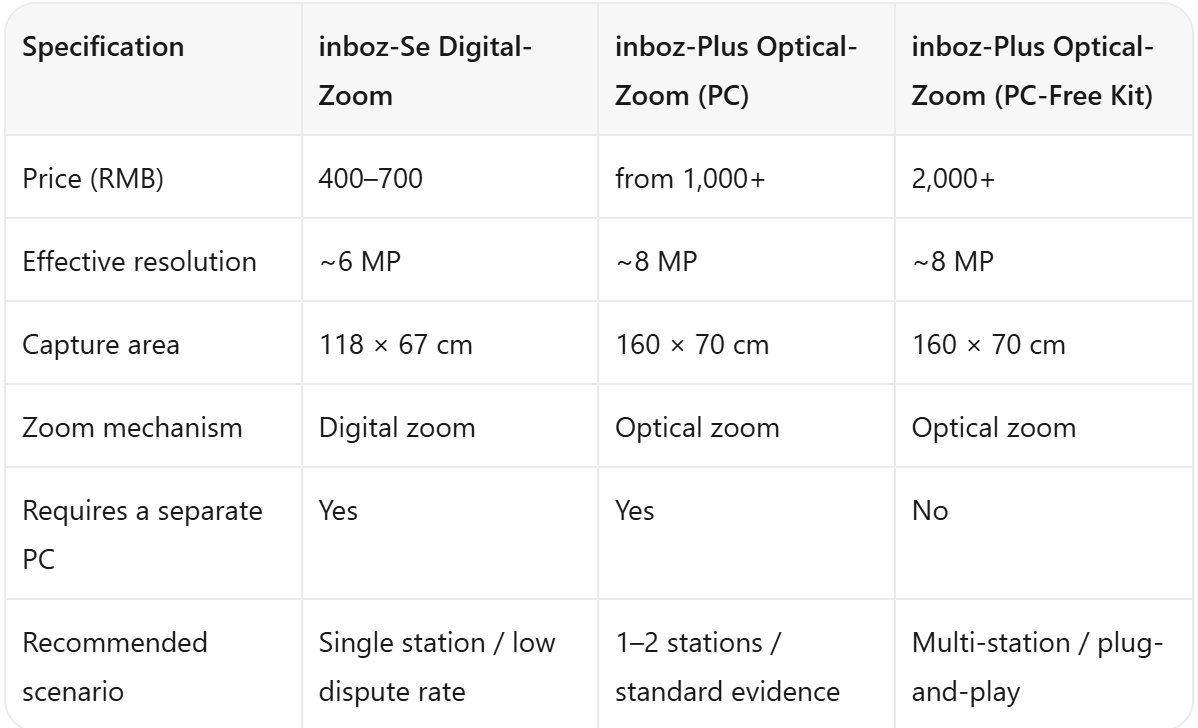
A note on 4K — frequently cited but misapplied. 4K is not recommended for the packing-monitoring category: file size balloons, storage fills fast, streams stutter. What determines evidence usability is the capture area and the zoom mechanism, not raw resolution. Our field-tested conclusion is that 8 MP plus optical zoom is today's sweet spot for packing surveillance.
On capture area: inboz-Plus reaches an upper bound of 160 × 70 cm. All standard e-commerce shipping scenarios we demonstrate — fishing rods, billiard cues, long down jackets, office chairs — fit inside this range. Parcels that exceed 160 cm require hub-level or warehouse-layout solutions outside the scope of standard packing-monitoring.
4. Five-Step Shipping Evidence SOP — How to Make the Equipment Actually Pay
Once installed, return depends on whether the SOP runs on every parcel. inboz's shipping evidence SOP is five steps: product display → barcode binding to tracking number → accessory display → carton sealing and label application → archive. The full loop closes inside 30 seconds.
Key design point: the system binds to the tracking number, not the order ID. The tracking number maps to an order, so ERP overhaul is unnecessary — scanning the barcode at the station triggers the camera to begin recording.
Complete five-step videos have demonstrated, in real platform mediation cases, a dispute-resolution success rate more than three times higher than footage with missing steps.
5. Decision Checklist — Which Tier Matches Your Operation
To choose between tiers, walk through three filters:
Filter one — return rate. Below 5% return rate, inboz-Se is sufficient. 5–10% return rate, choose inboz-Plus with PC. Above 10% return rate, or sensitive categories, choose the PC-free kit to eliminate per-station tuning overhead.
Filter two — package length. Standard color boxes, shoe boxes, jewelry boxes → Se. Long down jackets, fishing rods, billiard cues between 118 and 160 cm → Plus.
Filter three — station count. Single station → Se. Two stations → Plus with PC. Three or more stations → PC-free kit, front-loading setup effort into the install phase.
6. Frequently Asked Questions
Q1. What is a reasonable budget for packing monitoring?
A: Tie it to your loss-prevention account. If monthly dispute payouts are below RMB 1,000, the RMB 400–700 tier is enough. For RMB 1,000–5,000, choose the RMB 1,000+ tier. For above RMB 5,000 in payouts, or where agent time is constrained, choose the RMB 2,000+ PC-free kit.
Q2. How long a parcel can inboz-Se handle?
A: The Se capture area is 118 × 67 cm, suited to standard color boxes, shoe boxes, and jewelry boxes. If you regularly ship long down jackets, fishing rods, billiard cues, or office chairs — items exceeding 118 cm — upgrade to inboz-Plus.
Q3. Is the image quality the same between the PC-free kit and the PC-connected Plus?
A: Yes. Both use the inboz-Plus optical zoom lens and 8 MP sensor. The difference is solely the integrated host (PC-free kit) vs. a customer-provided PC.
Q4. After binding to the tracking number, how are recordings archived?
A: Files are auto-archived by tracking number on local storage (HDD or TF card). Retrieval by tracking number typically completes in 1–3 seconds, ready for platform mediation or legal discovery.
Q5. How do I choose between inboz-Se and inboz-Plus?
A: Ask two questions: (1) Do you regularly ship oversized parcels? (2) Do your packers need extended unattended background operation? If both answers are yes, go directly to Plus.
7. Summary
The question "how much does packing monitoring cost" has only one honest answer: it depends on your warehouse footprint, dispute volume, and opportunity cost. Sum the equipment outlay, the loss-prevention value, and the opportunity time — and the consolidated number is the budget you should allocate.
We recommend that budget-conscious operators start by assembling a "return-loss ledger" of the past six months: return rate, dispute volume, payouts, and customer-service handling time. Then match the ledger to one of the three tiers — RMB 400–700 Se, RMB 1,000+ Plus PC, or RMB 2,000+ Plus PC-free — and base the decision on data, not intuition.