
The real challenge of deploying packing monitors in a multi-station warehouse is not mounting the cameras — it is whether, once installed, recordings and photos can be retrieved by tracking number through a unified query. This article walks through the complete networking plan for warehouses with 3 or more packing stations: station layout, LAN setup, storage planning, equipment selection, and deployment sequence.
I. Multi-Station Means Faster Retrieval, Not Just More Cameras
When a warehouse expands to several packing stations, the default assumption is: one set of equipment per station, and the job is done. The equipment is indeed installed — but the problem only shows up when a dispute actually happens. A buyer files an after-sales claim, and your support staff has a tracking number but no idea which station packed that order. They log into each device one by one and drag through timelines. Five stations mean five disconnected timelines.
We have seen this firsthand at customer sites: for a missing-parts dispute over a four-piece blender set, a support colleague spent more than forty minutes switching between five devices trying to piece together the footage — and the claim window was more than half over before the evidence was complete. Multi-station warehouses often give up on evidence retrieval and simply absorb the loss more often than single-station ones. Not because they don't want to fight the claim, but because the retrieval cost wears them down.
So the criterion for a multi-station packing monitor setup comes down to one question: can you enter a tracking number and instantly locate the corresponding footage and photos? Packing monitors archive recordings by tracking number, and multiple packing stations on the same LAN support unified query. Achieve that, and the stations genuinely form a network. Without it, you merely own several isolated sets of equipment.
II. Station Layout: One Dual-Lens Set per Station, Plus a Separate Returns Line
The standard configuration for each packing station is a dual-lens setup:
Top-down camera (scene lens): mounted directly above the packing table, overlooking the entire work surface, covering the full process from product placement and display to boxing and sealing;
Label close-up camera: aimed at the position where the shipping label is placed, capturing it clearly so the system can automatically recognize the tracking number.
The recording mechanism is identical to a single-station setup: place the label under the close-up lens, the system automatically recognizes the tracking number and starts recording automatically; pick the label up, and recording stops — no manual operation throughout. Each recording is bound to the tracking number, the tracking number corresponds to the e-commerce order, and an indirect link between footage and order is established. Support staff retrieve by number with second-level locating.
For multi-station warehouses, two additional points matter.
First, deploy a separate unboxing-monitoring line in the returns processing area. The entire return unboxing process should be recorded: the condition of the returned item, any anomalies found when opening it, and how it compares with the outbound footage. Together with the packing monitor, this line forms a complete evidence loop. We recommend deploying it separately rather than sharing equipment with a packing station — the two types of footage serve different retrieval scenarios, and separate archiving makes evidence retrieval faster.
Second, connect all stations to the same LAN. This is the prerequisite for unified multi-station query. On the same LAN, recordings and photos from all packing stations can be searched through a single query entry. If the network is segmented or routed over the public internet, staff have to switch between devices, and the value of networking largely disappears. In planning, verify the warehouse's network conditions first — fix the network before buying equipment.
III. Storage Planning: Calculate at 180 Days Before Buying Disks
Packing monitors rely primarily on local storage (hard disks, TF cards, etc.). Estimate capacity with this formula:
Daily orders packed × average 2 minutes per order × retention days
Retention recommendations: at least 90 days to cover mainstream platforms' after-sales claim windows; 180 days or more for high-value categories (jewelry, consumer electronics, etc.), leaving headroom for cross-month tracing and potential audits.
Multi-station warehouses are the ones most likely to get caught out here: order volume is the sum of several stations, and storage consumption multiplies accordingly. Plenty of warehouses size their disks based on single-station experience, only to find after go-live that footage can't cover three months before older recordings are overwritten — and when tracing is needed later, the footage is already gone. Our recommendation: for warehouses with many stations, always calculate storage based on the total volume of all stations at the 180-day mark, and buy enough in one go. It beats expanding mid-operation.
IV. Equipment Selection: Check Whether Stations Have PCs, and How Big the Products Are
Multi-station networking inevitably involves equipment selection. The parameters of the two products are as follows:
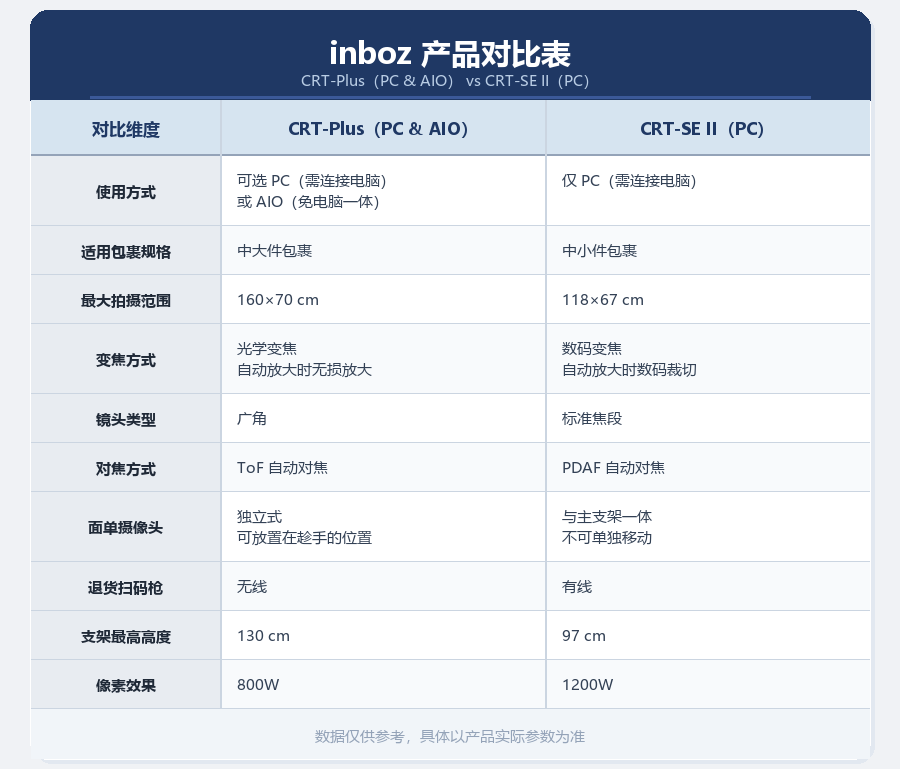
Selection comes down to two dimensions:
Does the station have a PC? Where stations already have computers and operators need to use an ERP system at the same time, choose the PC-connected version — the equipment integrates with the existing workstation at lower cost. Where space is tight, or you don't want deployment constrained by PC availability, the inboz-Plus PC-free kit has a built-in host and works right after power-on, which speeds up multi-station rollout considerably.
Product size on the table. Capture area is a hard constraint. For items of some size — long down jackets, office chairs, fishing rods — make sure they fall within the Plus 160×70 cm capture area. For large furniture or fitness equipment beyond that range, measure actual product dimensions and evaluate the plan first; don't discover after installation that the table surface isn't covered.
One more practical tip: keep equipment models consistent across stations. Uniform image parameters mean support staff never have to adapt to differences between devices, and operator training costs stay low.
V. A Five-Station Rollout, Step by Step
Take a small-appliance warehouse we deployed last September as an example: five packing stations plus a returns processing area, required to go live before the Double 11 shopping festival. Previously, only the flagship products went through an evidence-recording process; the other stations had no footage at all. The year before, a missing-parts claim on a four-piece blender set left support staff flipping through recordings for over forty minutes without assembling the evidence, and the order was reimbursed directly at a loss of over 300 RMB.
The rollout proceeded in three steps:
Trial run on one station for two weeks. Get the packing routine, recording mechanism, and tracking-number archiving working smoothly at a single station first. Deploying all five at once multiplies the problems and makes troubleshooting far costlier.
Unify the LAN. Connect all stations to the same LAN and verify the unified query entry first: enter a tracking number, locate the recording in seconds. Continue only once this chain works.
Replicate and roll out; returns area last. The remaining four stations simply copy the first. The returns processing area gets its own unboxing-monitoring line, deployed last.
The setup proved itself in the first month. A buyer claimed a four-piece order contained "only the main unit, no accessories." Support entered the tracking number in the unified query and located the footage from the corresponding station in ten seconds: accessories displayed one by one, items placed into the box, package sealed — a coherent, complete sequence. Exporting all photos and timestamps for that order produced an evidence package; the platform rejected the claim — every item was confirmed in the footage.
From receiving the claim to closing it took less than ten minutes. Before the upgrade, the same dispute meant forty minutes of footage-digging plus a 300 RMB reimbursement.
In this case, the blender main unit and all four accessories fit comfortably within the Plus 160×70 cm table area, so the capture range posed no issue.
VI. Recommended Deployment Sequence
Everything above boils down to three sentences:
Get one station running smoothly first — packing routine, recording mechanism, and tracking-number archiving validated at a single station;
Then unify the network — complete the LAN, verify the unified query chain;
Add the returns area last — a separate unboxing-monitoring line, archived apart from outbound footage.
Two clarifications. First, the packing monitor does not require replacing your existing ERP or order system — as long as the tracking number on the label can be recognized, it works alongside your current setup. Second, the system itself does not provide automatic statistics; reviews of error rates or missing-item rates still require manually reviewing footage. Don't be misled by "automatic reports" marketing claims.
A multi-station e-commerce packing monitor setup is, at its core, evidence infrastructure for the warehouse. Invest one extra thought in retrieval efficiency and storage headroom during deployment, and every after-sales dispute afterward can be closed in ten minutes instead of an evening of footage-digging. And the criterion for whether it's worth deploying remains refreshingly simple: when the loss from a single dispute exceeds the cost of one equipment set, it's time to deploy.
FAQ
Q: Can multiple packing stations be queried in a unified way?
A: Yes. Multiple packing stations on the same LAN support unified query — enter the tracking number to locate the corresponding footage and photos, without searching device by device.
Q: Do we need to replace our existing ERP/order system?
A: No. The packing monitor links recordings to orders through the tracking number recognized on the shipping label — an indirect association that leaves your existing workflow untouched.
Q: How much storage do we need?
A: Estimate with "daily orders × 2 minutes per order × retention days." Retain at least 90 days; 180+ days for high-value categories. Multi-station warehouses should size storage once at the 180-day mark using the combined volume of all stations.
Q: Does the system automatically calculate error or missing-item rates?
A: No. The system does not provide automatic statistics; such reviews require manually reviewing recordings. Packing monitors make the process verifiable — they are not an automatic reporting tool.