
In one sentence: The inboz packing monitoring system combines an overhead camera at the packing bench with a close-up camera for the shipping label. The tracking number on the waybill starts the recording, is written into the footage along with time and other data, and becomes the key under which everything is filed. The output is not "a surveillance clip" but "material that can be retrieved and submitted for one specific order."
When warehouses first deploy such a system, they tend to evaluate it the way they would evaluate a security camera: is the image sharp, is the coverage complete? That is not wrong, but it misses the actual centre of the system — the tracking number. This article takes inboz as the example and follows one order from the moment its waybill enters the frame to the moment an evidence package is exported, pointing out where deployments most often break down.
1. What gets recorded: one order, not one area
Ordinary warehouse cameras sit on the ceiling, use wide-angle lenses and cover a whole zone. Their purpose is security: detecting anomalies and tracking whether stock has moved. They file footage by camera ID and time range, so finding one order means estimating when it was packed and scrubbing through hours of video.
The inboz camera sits at the bench and records one parcel from product presentation through sealing. From its first frame the clip carries a tracking number, and searching by that number locates it directly. The former watches an area; the latter watches an order. The former serves security; the latter serves evidence.
In my view this distinction matters more than any specification — the whole of inboz is organised around the number rather than around the image. However sharp a clip may be, if it cannot be tied conclusively to one order, customer service cannot use it to prove anything. That is why "can we find it by tracking number" should be asked before "how many megapixels".
2. Starting point: the waybill goes under the close-up camera
A packing bench normally has two cameras with separate jobs.
The overhead camera is mounted directly above the work surface and covers the full process from product presentation to sealing. The waybill close-up camera does one thing: capture the label clearly enough for inboz to read the tracking number. A separate camera covers the returns inspection area for unpacking.
The standard sequence has five steps:
Place the waybill to start recording — with the label under the close-up camera, the system reads the tracking number and recording begins automatically.
Present the main product — hold it towards the overhead camera for about one second to show appearance, colour and specification.
Present accessories one by one — place each item in the display zone for about one second; never put them down as a pile.
Pack into the parcel — the action of placing product and accessories inside must be clearly visible.
Confirm sealing — hold the sealed parcel in frame for about one second, then lift the waybill; recording ends automatically.
Two questions come up almost every time. Does this slow packing down? Each presentation takes about one second, and placing and lifting the waybill are already part of the normal workflow — inboz simply borrows those two actions as the record button. No new motion is added. And what exactly is bound? The tracking number, not the order. The tracking number maps to an order, so the link between footage and order is indirect. Any claim that "the system binds orders directly" skips that intermediate step.
Two optional settings are worth knowing: pre-recording buffer (5 or 10 seconds, capturing the moments before the waybill is placed) and delayed labelling capture (time reserved for affixing the label, with a final automatic zoom on the waybill so the number stays legible). A compact window mode is also available where the packing PC must run printing software alongside the recorder.
3. What is written into the footage: letting the image identify itself
Recording is only the first step. When material reaches a platform's dispute team, the first question is "what makes this clip belong to that order?" Inboz therefore writes identifiers into the frame instead of relying on a written explanation afterwards.
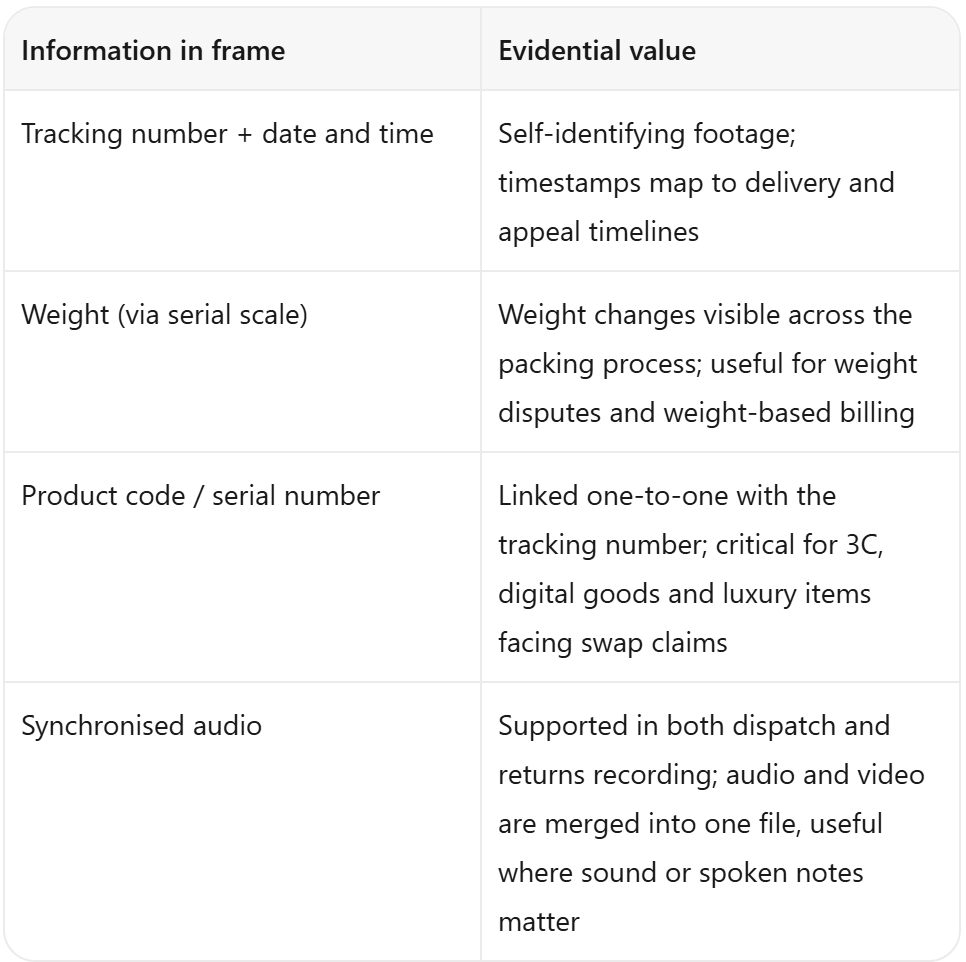
A second track runs alongside video: photographs. During recording inboz can capture stills automatically by rule, and operators can take a manual snapshot with a shortcut. These images are filed under the same tracking number as their video and can be viewed or exported. This deserves emphasis: dispute handlers rarely have time to scrub through a full clip, and a set of key frames arranged on a timeline is usually accepted faster than eight minutes of continuous video. It is a judgement I have seen confirmed repeatedly in after-sales work.
One layer further out is remark tags. Tags such as missing item, stain, damage, anomaly, swap or scratch can be preset and customised in settings; operators mark them during returns inspection and later filter all similar cases in one pass.
4. End point: filing, retrieval and export by tracking number
For inboz, capture is only the data layer. Usability depends on retrieval speed.
There are normally two search paths: by tracking number or keyword, or by remark tag from a dropdown. Once an order is selected, all photographs and timestamps for that order can be exported in one action as a package ready for platform submission. Where a ledger is needed, the tracking number, product codes, serial numbers and weights can be exported to Excel instead of being typed up by hand.
This step looks unglamorous, but in my experience it is exactly where teams either start benefiting from the system or do not. I have seen warehouses with perfectly complete archives where customer service still had to ask "which PC holds this one?" — retrieval took barely less time than before installation.
Storage is primarily local. Save paths, retention periods, automatic cleanup of expired clips and previously used archive paths can all be managed in settings. We recommend retaining footage for at least 90 days to cover platform appeal windows, and 180 days or more for high-value categories. Capacity can be estimated as "orders per day × roughly 2 minutes per order × retention days".
5. Multiple benches: unified search on one local network
As bench count grows, the question shifts from "is the image clear" to "which machine holds the file".
Within one local network, each packing station can be given a device name and access address, and other recording devices added by IP and port. A single interface then searches records across all devices by tracking number, keyword, date or type, showing the total record count and the source device. Customer service can download footage from another bench directly, without walking over to copy files from a local drive.
The boundary should be stated plainly: this is unified search and retrieval within one local area network, not cloud-centralised storage or a cross-region platform. Think of it as combining the search entry points of several local machines.
6. A 3C accessories warehouse: one order in practice
One 3C accessories team using inboz ships a little over 300 orders a day, selling kits with a charging plug and two cables. A buyer requested a refund three days after delivery, claiming one cable was missing.
Customer service pulled a 35-second clip by tracking number. The waybill enters frame, with the number and timestamp along the bottom edge; the main product is lifted and shown; two cables and the plug are each held in the display zone; all of them go into the parcel; the seal is held in frame briefly; the waybill close-up zooms automatically before recording ends. In the lower left, the weight reading moves from 0.18 kg to 0.24 kg as the accessories go in. Four stills captured automatically by inboz line up with the four moments: product, accessories, into the parcel, sealed.
They did not submit the full clip. They exported a screenshot package arranged on a timeline, with the tracking number attached. The appeal result came back two days later and was not rejected again.
What stayed with me from that case was not the hardware. It was that the evidence for that order was already complete at the moment of packing — nobody had to hunt through archives afterwards, write an explanation, or reconstruct who packed it. A large part of what inboz delivers sits in that shift from after-the-fact explanation to before-the-fact record.
7. Four things to check before deployment
Test one real order after installation. Zoom into the final waybill frame and confirm the number is legible. Backlighting and overexposure producing a washed-out image are the most common causes of a useless installation.
Show accessories individually. Missing-item disputes turn on whether something went into the parcel; piling items on the desk erases that evidence.
Record returns unpacking too. Disputes are no longer only about what was shipped, but about whether what came back is what went out.
Do not expect a complete overhaul at once. Fix the two most painful points first: a legible waybill and accessories in frame.
None of these four is a hardware capability issue. They are process and habit.
8. Frequently asked questions
What if the waybill cannot be read?
Reflection, creases, placement outside the camera's field of view and overly strong lighting are the usual causes. Adjust the close-up camera angle and lighting first, then confirm the label is in frame. Parcels without a waybill can be handled with a manual recording shortcut.
How does footage map to an order?
Indirectly, through the tracking number. The number is captured; the number maps to an order in the ERP or platform backend. No replacement of the existing ERP or labelling system is needed, provided the number on the waybill can be read.
Must the full video be submitted?
In most after-sales scenarios a package of key frames on a timeline is accepted more readily. Keep the full clip as the source record and submit the key frames first.
Does the system analyse mis-pack rates automatically?
No. It handles capture, filing, retrieval and export; review still requires a person to examine the footage. Any expectation of automatically generated reports should be clarified before selection.
Closing note
From the waybill starting the recording, to identifiers written into the frame, to retrieval and one-click export by tracking number — the whole chain answers a single question: when something goes wrong, can the scene of that one order be reconstructed within minutes?
Resolution, coverage and zoom determine the ceiling of image quality. Completeness of the chain determines whether the system is usable at all. For teams still filming by hand, the practical starting point is a legible waybill and accessories shown one by one; automation of recording, filing and export can follow once volume and bench count grow.
inboz is a Guangzhou-based specialist in e-commerce packing monitoring and full-chain traceability, focused on visual evidence for packing and unpacking rather than general-purpose security products. To assess a configuration against your own bench count and labelling workflow, see the product centre or contact inboz.