
Post-sale disputes in e-commerce warehouses often arise not because the product is defective, but because the evidence is missing or incomplete. Many merchants still fail to produce valid footage at critical moments because packers operate without standardized training. Compared with hardware investment, the standardization of training is the real variable that determines whether a shipment-evidence system works.
This article is written for warehouse supervisors, training managers, and frontline packers. It presents a six-step training routine covering product display, barcode binding, accessory display, sealing and labeling, self-check, and video archiving, along with an acceptance checklist and equipment-selection guidance to help teams turn "every order is traceable" from a slogan into daily practice.
1. Why Standard Moves Matter More Than Specs
The core value of packing monitoring is to provide traceable video evidence when a post-sale dispute occurs. Whether the video is accepted by platform mediators, customer-service teams, or legal procedures depends on three conditions: complete footage, traceable tracking number, and a process that can be reconstructed.
If packers rely only on experience, the footage may cover only the sealing step and miss the product body and accessories. If scanning starts too late, the beginning of the video is lost. If files are named randomly, retrieval becomes impossible. These problems cannot be solved by upgrading hardware; they must be solved through standardized training.
Therefore, the first step in training is not to introduce device features, but to make every packer understand: each move corresponds to a specific risk, and each move has a clear pass/fail standard.
2. The Six Standard Moves
Move 1: Product Display — Let the Camera See What Is Being Shipped
The packer should place the product front, side, and key identifiers in front of the camera, holding each angle for two to three seconds. For multi-SKU categories such as footwear, beauty products, and 3C accessories, the product label, model, or batch number must be clearly visible.
This move addresses disputes such as "the received item does not match the description" or "wrong item shipped." Showing the product body is the foundation of all subsequent evidence.
Move 2: Barcode Binding — Create a Unique Link Between Video and Tracking Number
Open the recording software and the ERP system at the same time. After scanning the express tracking number, the ERP locates the order and the recording software starts automatically. It is important to note that the system binds the express tracking number, not the order number; the tracking number corresponds to the order indirectly.
After scanning, the packer should confirm that the recording indicator is on or that the time code is running before proceeding. This step is the key index for retrieving video by tracking number later.
Move 3: Accessory Display — Eliminate "Missing Item" Disputes at the Source
Lay out all accessories, gifts, and manuals inside the package within the camera's field of view and display them one by one. This is especially important for jewelry, gold products, 3C accessories, and sporting goods.
In practice, many post-sale disputes are not about the product itself, but about whether accessories are complete. The accessory-display step resolves such issues before shipment.
Move 4: Sealing and Labeling — Record the Complete Process of the Package Leaving the Station
The sealing action should be fully captured. After applying the label, hold the express tracking number in front of the camera for one to two seconds. This move proves that the package was intact and correctly labeled when it left the station, effectively preventing claims of "empty package," "wrong tracking number," or "package was opened."
The shooting range should be controlled within the maximum range supported by the device. The inboz-Plus optical zoom model supports a shooting range of 160×70 cm, which meets the needs of most standard packing stations.
Move 5: Self-Check — Review Key Frames Before Release
Peak hours are when missed shots and frame drift are most likely to occur. We recommend installing a small playback screen next to the packing station. Before pushing the package into the shipping area, the packer should self-check whether the current recording contains the three key frames: product, tracking number, and sealing.
Passing the self-check before release catches errors inside the warehouse rather than exposing them during post-sale disputes.
Move 6: Video Archiving — Name by Tracking Number and Store Locally
Recorded videos should be named by express tracking number and stored on a local hard drive or TF card. Local storage is the primary method. Files should be archived by both date and tracking number.
The goal of archiving is to locate the target video within one minute when needed. No matter how clear the footage is, it cannot serve as evidence if naming is chaotic or storage is scattered.
3. Common Mistakes vs. Standard Moves
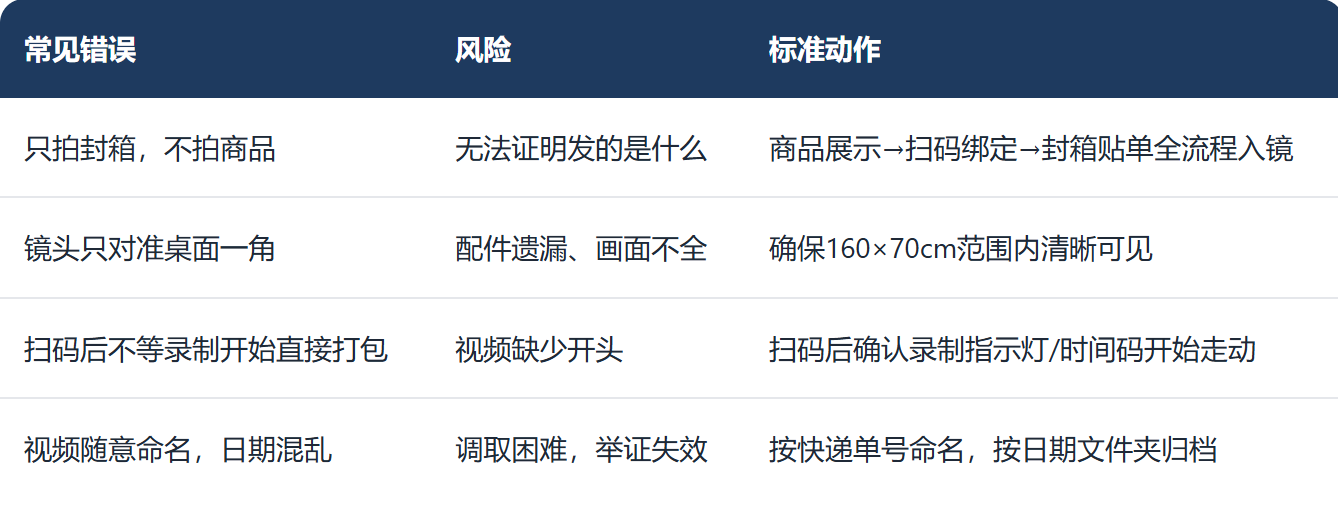
4. Equipment Selection Guidance
Different warehouse conditions call for different equipment solutions.
inboz-Se Digital Zoom Edition
Equivalent to 12-megapixel resolution
Price: 400–700 RMB; requires PC connection
Shooting range: 118×67 cm
Digital zoom
Suitable for single-station, low-SKU, budget-sensitive warehouses
inboz-Plus Optical Zoom Edition
Equivalent to 8-megapixel resolution
PC-connected version: 1,000+ RMB; standalone set: 2,000+ RMB, plug-and-play
Shooting range: 160×70 cm (maximum limit)
Optical zoom for clearer distant details
Suitable for high-value products, multi-accessory items, and women's apparel / live-streaming apparel categories
It should be specially noted that 4K cameras are not suitable for packing monitoring. 4K files are large, consume storage, and stutter during playback. In this field, zoom method matters more than resolution. For categories such as women's apparel with special aspect ratios, the inboz-Plus solution is required.
5. Training Acceptance Checklist
After training, we recommend that warehouse supervisors conduct a "three-order practical test" for each packer: randomly select three real orders, let the packer complete all six standard moves independently, and score against the following checklist:
Is the product body fully in frame?
Is the product label or model clearly visible?
Does recording start promptly after scanning?
Is the express tracking number legible in the video?
Are accessories and gifts displayed one by one?
Is the sealing process fully recorded?
Is the video file named by tracking number?
Does the archive path follow the date convention?
Only after passing all items should the packer work independently. We also recommend a monthly spot check of video quality to reinforce habits.
6. Frequently Asked Questions
Q: How long does the training cycle take?
A: Half a day for theory, one day for hands-on practice, and half a day for assessment. Most packers can master the standard moves within two days.
Q: Do experienced packers also need retraining?
A: Yes. We recommend uniform retraining for all active packers. Experienced staff often develop habitual moves, and retraining helps identify and correct non-standard habits.
Q: Can the system be used without an ERP?
A: Yes. Without an ERP, you can manually enter the tracking number or use a barcode scanner to trigger the recording software. The key is to establish the correspondence between the tracking number and the video.
Conclusion
The last mile of a shipment-evidence system is not hardware, but people. Only when the six standard moves are embedded in every packer's daily routine can a business truly make every order traceable in a dispute.
If you are planning a shipment-evidence solution for your warehouse, visit inboz.cn to learn more about packing monitoring options and training implementation support.