
Packing monitoring has shifted over the past few years from an optional add-on to a near-standard for e-commerce warehouses. The driver is not a sudden change in hardware, but a change in the post-sale environment: platform mediation increasingly demands evidence, professional swap-and-claim cases are on the rise, and the new live-streaming e-commerce rules have extended the retention period to three years. Under these pressures, shipment evidence is no longer a nice-to-have; it is a must.
For warehouse teams approaching the topic for the first time, the difficulty is not which device to choose, but how to sequence the rollout. This guide lays out a complete path from needs assessment to long-term inspection, and at each stage highlights the mistakes beginners most often make, so you can actually get the system running.
1. Five-Stage Roadmap
The rollout of packing monitoring can be split into five stages. Proceeding in order saves significant trial and error:
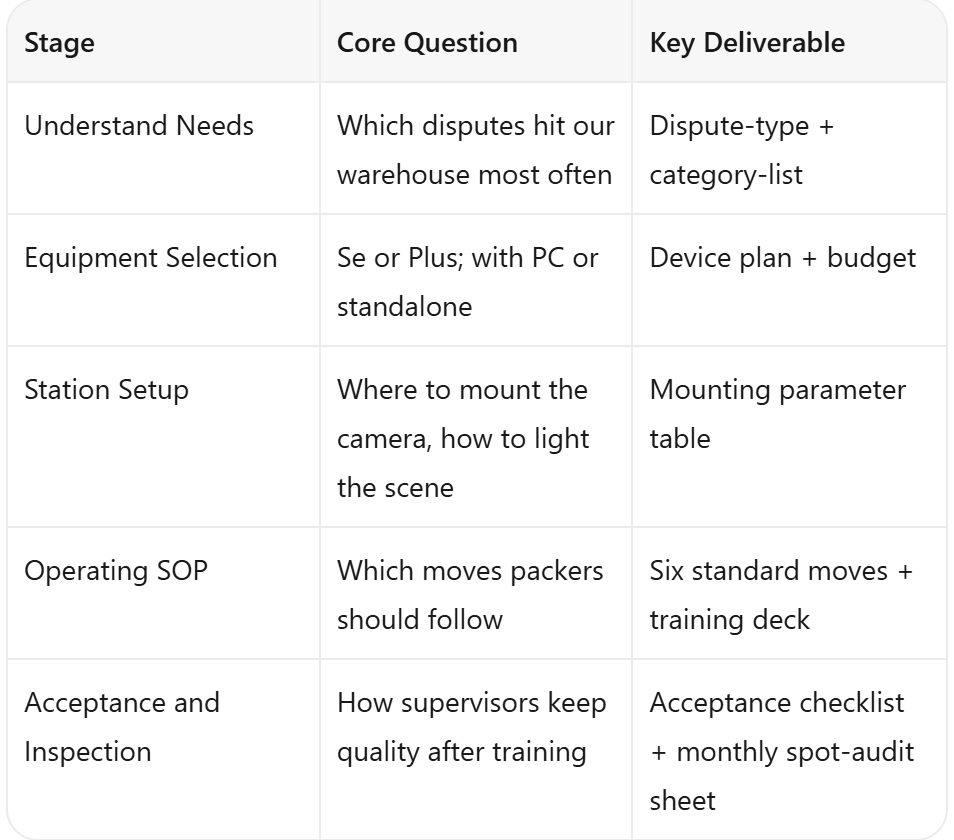
These five stages are not project milestones that end once ticked off. They form a continuous loop; even after all five are completed, ongoing adjustment is required based on dispute data.
2. Stage One: Understand Needs
Many beginners skip this stage and jump straight to device selection. The result is often a mismatch: a single-station warehouse buys a multi-station solution, or a jewelry category ends up with an entry-level model.
Before comparing devices, answer three questions:
Which type of dispute hits your warehouse most often? "Empty box on arrival" swap claims, or "item not as described" evidence disputes?
How complex is your SKU mix? Categories with many SKUs and rich accessories (jewelry, 3C accessories, footwear) need a wider shooting range;
How is your price-point distribution? Higher-ticket items demand finer zoom precision and clearly visible distant detail.
Once these three questions are answered, comparing the inboz-Se digital zoom edition (118×67 cm) with the inboz-Plus optical zoom edition (160×70 cm) becomes a grounded decision.
3. Stage Two: Equipment Selection
Selection is not a spec-sheet contest. It is the answer to three operational questions:
Who triggers the recording? Manual triggering adds a step for the packer. Scan-triggered automatic recording requires an ERP-linked solution. The system binds the express tracking number, not the order number; the tracking number corresponds to the order indirectly.
How wide must the shot be? A single station can use a standard unit; multiple stations require a networked solution with centralized storage, so each station is not managed separately.
How long must footage be kept? Platform mediation usually requires the last 30 days, but the new live-streaming e-commerce rules require a three-year retention. The storage plan must reserve that space. Local storage (hard drive or TF card) is the primary choice.
Once these three questions are clear, you can avoid buying a device only to discover it does not link with your ERP, or that storage runs short too soon.
Two Main Options
inboz-Se Digital Zoom Edition: Equivalent to 12-megapixel resolution, priced at 400–700 RMB (requires PC connection), shooting range 118×67 cm, digital zoom. Suited to single-station, low-SKU, budget-sensitive warehouses.
inboz-Plus Optical Zoom Edition: Equivalent to 8-megapixel resolution, PC-connected version 1,000+ RMB; standalone set 2,000+ RMB (with built-in host, plug-and-play), shooting range 160×70 cm (maximum limit), optical zoom. Suited to high-value, multi-accessory items, women's apparel and live-streaming apparel categories.
A specific note: 4K cameras are not suitable for packing monitoring. 4K files are large, consume storage, and stutter during playback. In this field, zoom method matters more than resolution.
4. Stage Three: Station Setup
Once the device is in hand, the mounting position, angle, and lighting determine the final image quality. Beginners should follow three principles:
Top-down straight-down framing: Aim the camera straight down at the center of the packing table to cover the full 160×70 cm range and avoid distortion from angled shooting;
Ambient plus fill light: Use warehouse ceiling lighting as the main source and a packing-table fill light as the supplement, avoiding backlight that makes tracking numbers reflect and blur;
Tracking-number visibility: After applying the label, hold the tracking number in front of the camera for one to two seconds to ease later retrieval.
For specific mounting parameters (height, fill-light color temperature, camera tilt angle), see the dedicated packing-station setup guide.
5. Stage Four: Operating SOP
A device alone does nothing. Packers most often miss shots or shoot incorrectly during peak hours—when they are busy, they record only the sealing step and miss the product body and accessory display.
We recommend breaking shipment evidence into five core steps, supported by six standard moves:
Product Display: Hold the product front, side, and label in front of the camera for two to three seconds each.
Barcode Binding: Open the recording software and the ERP at the same time; after scanning the tracking number, recording starts automatically.
Accessory Display: Lay out all accessories, gifts, and manuals inside the package for display.
Sealing and Labeling: Capture the sealing process fully and hold the tracking number in front of the camera for one to two seconds.
Video Archiving: Name videos by tracking number and store them locally.
Once packers follow this routine, recording shifts from "shooting by feel" to "shooting by standard."
6. Stage Five: Acceptance and Inspection
Training alone is not enough. Supervisors must verify on the floor. We recommend a "three-order practical test": randomly select three real orders, let the packer complete all six standard moves independently, and check whether the recording contains product display, barcode binding, accessory display, sealing and labeling, and video archiving.
Only after passing the test should packers work independently, and a monthly spot check of video quality should follow. Whether packing monitoring actually delivers value depends on whether this gate is held.
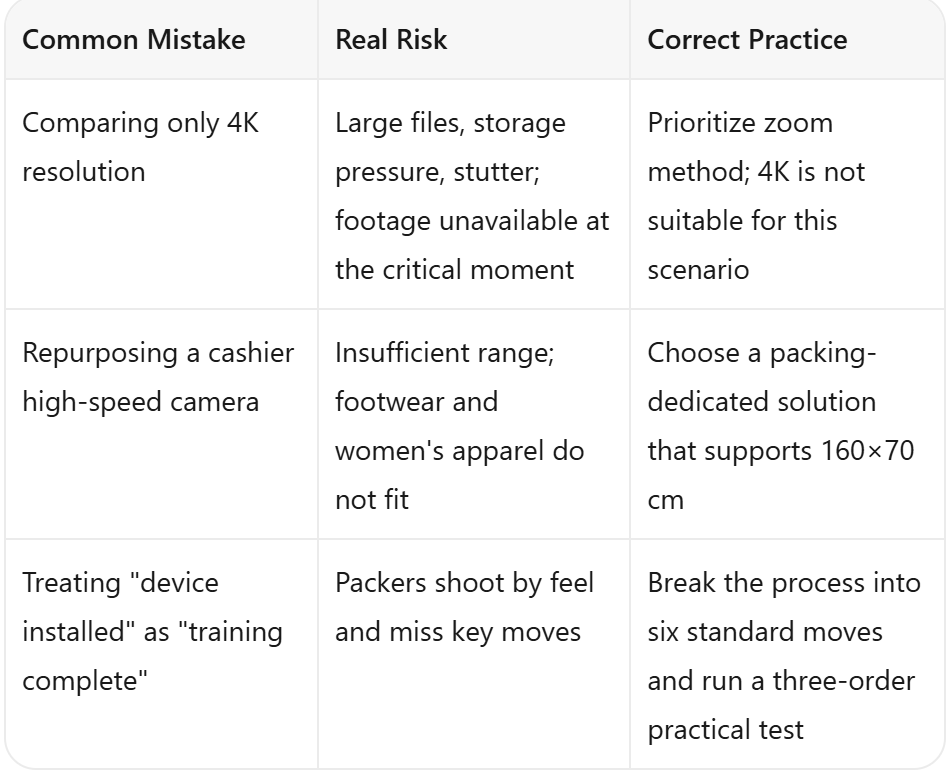
7. Three Pitfalls Beginners Most Often Hit
8. From Zero to Running: A Three-Step Rollout
For warehouses new to packing monitoring, we suggest a three-step rollout:
Step One (1–2 weeks) — Equipment selection plus a single-station pilot, getting one station's full flow running;
Step Two (1–2 months) — Multi-station expansion plus SOP training, replicating the successful experience across stations;
Step Three (ongoing) — Monthly inspection plus targeted upgrades, using dispute data to identify weak spots in devices and processes.
Packing monitoring is not a one-time hardware investment; it is a long-term effort tied to training, process, and inspection. Getting it running first, then iterating, is more realistic than trying to do everything at once.
Frequently Asked Questions
Q: How should I choose between single-station and multi-station warehouses?
A: A single station can use a standard unit directly. For three or more stations, plan a networked solution with unified storage from the start.
Q: Should I choose a PC-connected version or a standalone set?
A: If your warehouse already has PCs and can keep the software running, the PC-connected version is more economical. If you want plug-and-play without tying up office PCs, the standalone set is the better choice.
Q: Should footage be stored in the cloud or locally?
A: Local storage (hard drive or TF card) is recommended as the primary method, with cloud as backup. Local storage offers faster retrieval and suits high-frequency post-sale access.
Q: How long does packer training take?
A: Half a day of theory, one day of hands-on practice, half a day of assessment. Most packers master the standard moves within two days.
Q: How long must footage be kept under the new live-streaming e-commerce rules?
A: The new rules extend the retention period to three years. Plan storage capacity for three years and roll older files off as needed.
Closing Notes
The barrier to entry for packing monitoring is not high. The hard part is making it run as a daily routine. The five-stage path laid out in this guide has been validated across multiple warehouses; following it in order saves significant trial and error.
For deeper reading, you can branch into any of four specialties: equipment selection, station setup, SOP training, or inspection and acceptance. Each has its own detailed playbook.
Visit inboz.cn to learn more about packing monitoring selection and training implementation support.